

Learning new camp scheduling software takes time.
So does building a summer schedule for every group, every activity, every specialist, every resource, and every rule that makes your program work.
That's the reality of camp scheduling. Your schedule isn't just a spreadsheet. It's the program you've promised your families—and it needs to reflect the experience, values, activities, staffing, and logistics that make your camp yours.
That's why, as summer wraps up, I've been asking our clients a simple question:
What worked? What didn't? And why?
I recently had that conversation with Ariella G from Camp Bais Yaakov, who used Camptivities to build her camp's schedules this summer.
When we first started working together, her goals were straightforward: save time, have the week's schedule ready ahead of time, and stop spending late nights trying to make a complicated schedule work.
At the end of the summer, I asked her whether she met those goals.
Her answer?
“They were all met.”
The first schedule wasn't fast. And that's okay.
One thing I think is important to acknowledge when talking about scheduling software is that there is a learning curve.
Ariella's first schedules took significantly longer because she was learning Camptivities while also learning how to translate her camp's rules and programming into the system.
But the more she used it, the easier it became.
She explained that using the system consistently was the biggest difference. Once she was working in Camptivities every day and every week, she developed what she called “muscle memory.”
By the end of the summer, she was able to create and format a week's schedule in about 2.5 hours.
And perhaps even more importantly, she wasn't staying up late to do it.
As Ariella put it, she saved a tremendous amount of time.
The goal wasn't just a faster schedule
Speed wasn't the only thing Ariella was looking for.
She also wanted to maintain the quality and variety of her camp's programming without spending hours manually balancing every group.
Before Camptivities, her team built schedules in Excel. That gave them complete manual control—but it also meant making a lot of exceptions and constantly checking for conflicts.
With an automated starting point, the process changed.
Instead of building every group's schedule from scratch, Ariella could let the system do much of the initial scheduling and then make adjustments where she wanted them.
And she was honest about something important: giving up some of that manual control took some getting used to.
For example, there were times when she would have made a different decision about how often a particular specialty appeared for a group.
But she also recognized the tradeoff.
She didn't have to manually build every schedule to ensure that every group had something to do.
In her words, “I never had a day where no one had an activity.”
That's a pretty meaningful outcome.
The reports became part of the scheduling process
One of the unexpected benefits for Ariella wasn't just creating the schedule—it was being able to look back at it.
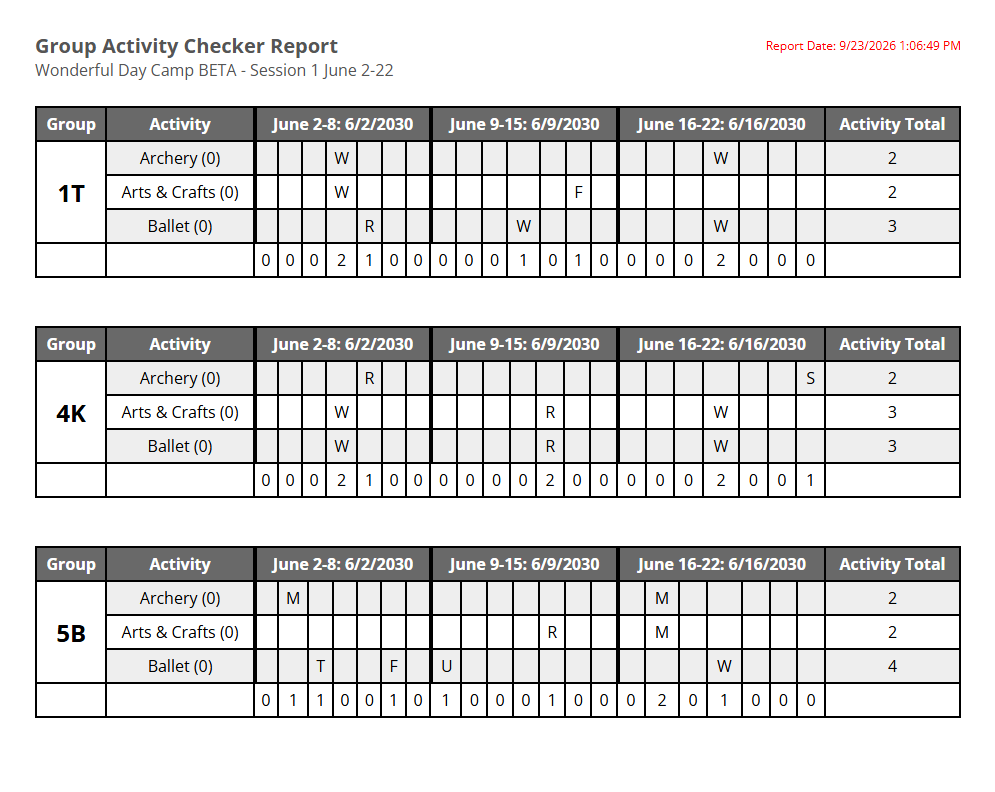
She particularly liked the specialty reports she could print and share with her team.
Every Sunday, she could send out the week's schedule.
And when a group had an opening in its schedule, she could look at the reports to see how often that group had already participated in different specialties.
Had they already done an activity three times that week?
Then maybe that wasn't the best choice for the opening.
That visibility gave her another way to make informed scheduling decisions without having to keep all of that information in her head.
And then camp happened
This is one of my favorite parts of the conversation.
Toward the end of the summer, Ariella's camp had no water in its building for a week and a half.
They had to move buildings, rethink their plans, and eventually send groups on trips because they didn't have a building available for them.
The schedules had to change.
And they did.
But Ariella still had a scheduling system she could work from.
As she put it, the scheduling process made a real difference.
Because that's the thing about camp: the schedule you build in the spring is almost never the exact schedule you end up running.
Staff call out.
Weather changes.
Buildings become unavailable.
Activities move.
Groups need to be reassigned.
The value of a scheduling system isn't simply that it creates a schedule.
It's that it gives you a much better starting point—and makes it easier to manage the changes that inevitably happen once camp begins.
What's next?
Ariella and her team handled activity scheduling successfully this summer.
Next year, she's looking forward to taking the next step: using the staff scheduling capabilities in Camptivities.
This summer, she emailed staff their schedules each week.
With staff scheduling, the goal will be to give each staff member access to their own current schedule and make changes easier to communicate when availability changes.
That's the next layer of the scheduling process.
And that's also why I value these end-of-summer conversations so much.
The best product feedback doesn't come from asking, “Did you like the software?”
It comes from asking:
What were you trying to accomplish? Did you accomplish it? What got easier? What was still difficult? And what do you want to do better next year?
In Ariella's case, the answer was pretty clear.
The learning curve was real.
The first schedules took work.
But by the end of the summer, a process that once consumed late nights had become a roughly 2.5-hour weekly task.
And sometimes, especially during a summer when your building doesn't have water, having one less thing keeping you up at night is a pretty big win.


