
Introducing Whereabouts: Real-Time Camper Communication & Awareness Tool

We’re excited to share something big from the Camptivities team — Whereabouts is here!

Whereabouts is a real-time communication and attendance platform built specifically for out of school time (Day Camps, Afterschool, and Overnight Camps with camper choice). It brings parents, staff, and administrators together so everyone stays connected — from drop-off to pick-up.

Why We Built Whereabouts

If you’ve ever worked in a camp office or managed daily operations, you’ve felt those heart-stopping moments:

  • A camper accidentally gets on the bus but their parents are there to pick them up.

  • You hope every camper got to their group while you reconcile attendance papers

  • It's the last day of the session and a staff member forgets to return medication.

You’re not alone — and camps told us they needed a better way.

Whereabouts brings parents, admin teams, and counselors into one connected, human-powered communication platform that tells us who’s where, shares updates instantly, and keeps everyone informed throughout the day. 

What We Learned From 18 Months of Beta Testing

We spent a year and a half testing and interviewing camps across the country. Here’s what we heard loud and clear:

  • Parents expect stronger safety and communication practices than ever before.

  • Office teams want less stress and more certainty in daily logistics.

  • Staff want quick access to key camper details right at check-in to better connect with kids -  Birthdays, medications, and more.

  • Even camps with tech-free policies discovered that staff felt more comfortable using a camp-issued tablet (like an iPad mini) than pencil/paper, which helped them take attendance faster, smoother, and more accurately.

And yes, everyone wanted this in one single system that also includes the tools parents already love:

  • Attendance without calling the office

  • One-way messaging

  • Photo integration

  • Newsfeed and events

  • And so much more..

Ready to See It?

If you’re curious — or reconsidering your current parent app — we’d love to show you how Whereabouts can simplify communication, streamline your office, and enhance camper operations and safety.

Let’s chat. Your camp deserves technology that makes every day smoother for families, staff, and of course, campers.

Let's Chat!

Solving the Scheduling Puzzle: JCC Staten Island’s Journey with Camptivities

Megan in program at camp

If you’ve ever spent late nights fixing double scheduled activities or trying to make sure every group gets their turn at the ropes course, JCC Staten Island’s story will sound familiar—and inspiring.

What made you decide to use Camptivities?

Dena approached our directors during the Tri-State Camp Conference and started a conversation about Camptivities that piqued their interest. They set up a call with the whole team, and after seeing the demo, we were very impressed and decided to move forward.

Scheduling Process at the JCC Staten Island Before Camptivities:

  • The schedule was static for the summer—each week repeated the one before.

  • If a director couldn’t schedule a specific activity for their group, that group simply didn’t get that activity that summer.

  • Mistakes, conflicts, and double bookings were commonly discovered during the first couple of weeks of camp. 

  • The meeting took about 5–6 hours.

  • Finalizing all schedules took 2–2½ weeks.

Benefits of using Captivities at the JCC Staten Island:

  • Creates schedules in advance

  • Creates a varied schedule each week.

  • Ensures every group participates in all camp activities by using the “look-back” feature.

  • Campers are happier since they get to go to all activities

  • Parents are appreciative that their kids experience everything camp has to offer.

  • Division leaders can focus on programs and campers instead of scheduling. 

Are you now looking at scheduling differently because of the certainty of using Camptivities?

Absolutely! I’m able to make the schedules in advance, and changes are easy to handle with the “available activities” feature. The Activity Group Checker Report lets me quickly see which groups still need specific activities.

Creating schedules is no longer stressful, and since we share a facility with two other camps, Camptivities has also helped us minimize mistakes and scheduling conflicts.

Discover how Camptivities can help your team build error-free, more balanced schedules in less time—just like JCC Staten Island.  

Let's Chat!

From Mission to Metrics: KPI Ideas for Camps

an archer and 3 targets with bullseyes

Ever wonder which parts of your camp are really making an impact?

Running a successful camp is about more than activities and schedules. It’s about understanding what’s working and where you can improve. By looking at your camp through a lens of data, you can turn everyday observations into measurable insights, make informed decisions, and set goals that truly enhance the experience for your campers and staff.

In our previous post, Simple KPIs to Guide Your Camp’s Growth, we explored how KPIs (Key Performance Indicators) can help connect your mission to meaningful goals. This next step is about choosing KPIs that align with your camp’s unique purpose because the most valuable data reflects what your organization cares about most.

Start With Your Mission

Your camp’s mission is the lens that brings your data into focus. Think about what your organization values most, then choose KPIs that show how well you’re living out those values.

For example:

  • Community & Belonging: % of campers who report making a new friend

  • Growth & Skill-Building: % of campers who tried a new activity or improved a skill

  • Staff Excellence: Staff return rate year over year

  • Camper Retention: % of campers returning next summer

Each of these metrics can help you demonstrate how your mission comes to life in measurable ways.

Turn Data Into Stories

Once you start collecting this information, your data can do more than measure progress—it can tell the story of your impact.

  • For boards or funders: Use KPIs to show outcomes and justify new investments in programs, equipment, or staffing.

  • For prospective parents: Use KPIs to highlight how your camp delivers on its promise—connection, growth, and confidence that lasts beyond summer.

Numbers alone don’t make decisions—they support the story you already know to be true about your camp.

Ready to Build Your Framework?

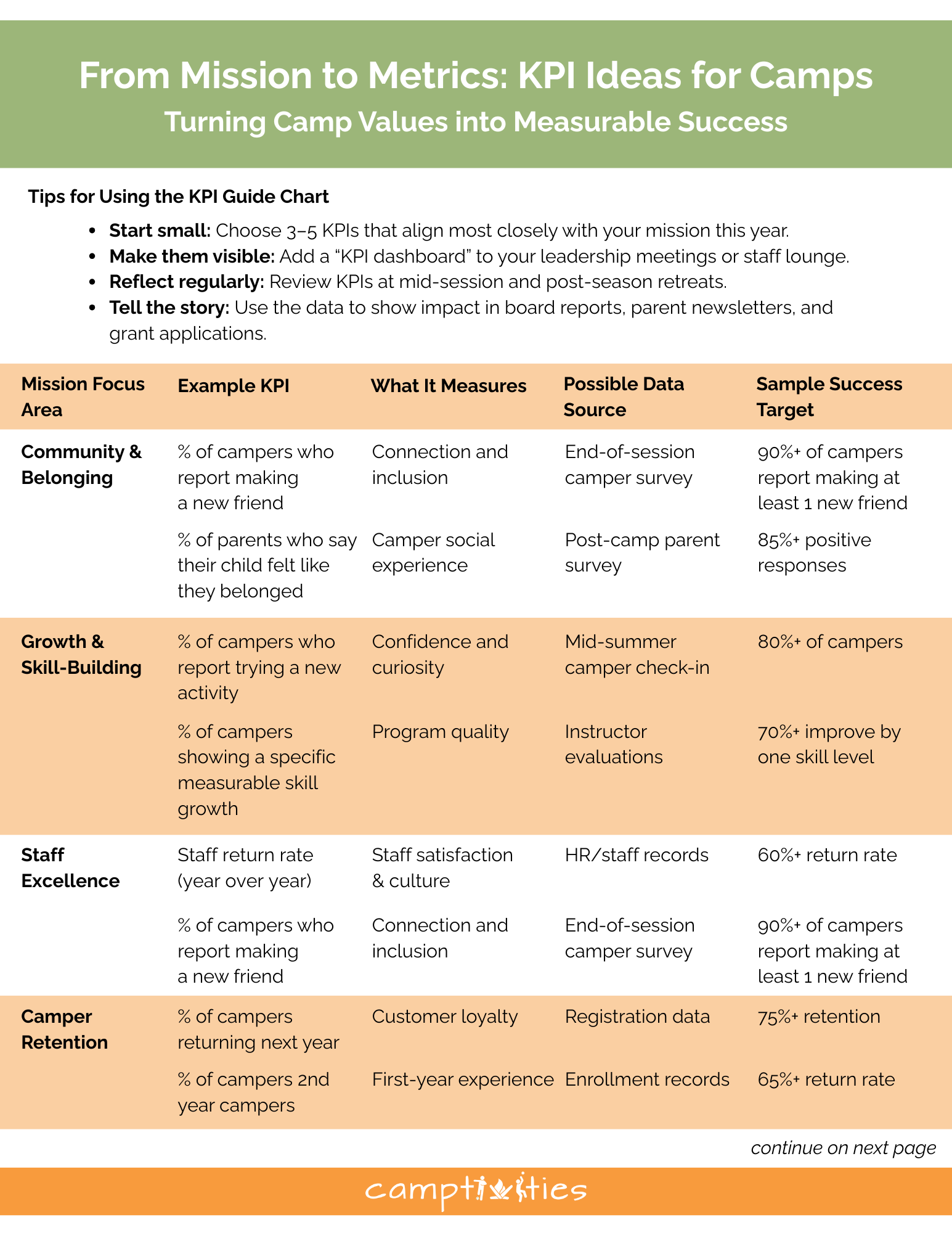
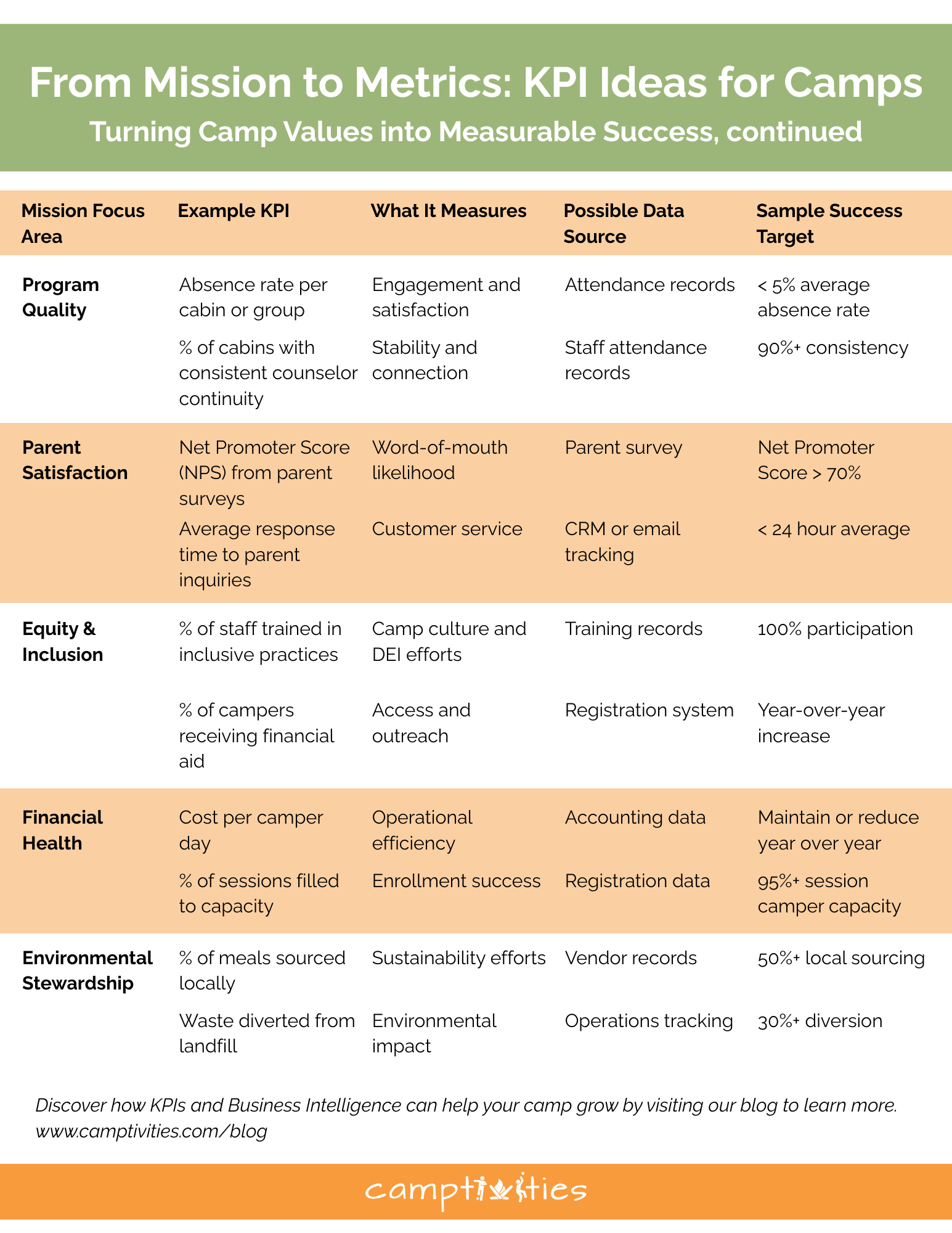
If you’re new to tracking KPIs, this chart is a great place to start. It highlights examples of measurable goals that can guide your camp’s growth and success. Use it to identify a few KPIs that align with your mission, then refine each one by defining what success looks like for your organization.

Download these charts to find ideas for KPIs that connect directly to your mission and goals.

Download here

For next steps and practical advice on putting KPIs into action, check out our blogs:

Learn more

Why Summer Camps Are Ditching Spreadsheets and Automating Weekly Schedules

The End of the Spreadsheet Era

For decades, spreadsheets were the backbone of camp planning. Directors color-coded activities, manually shuffled groups, and painstakingly adjusted staff assignments. However, as camps expand and programs become more sophisticated, parents expect more tailored experiences—and spreadsheets are showing their limits. Across the industry, a clear shift is underway: summer camps are moving away from manual scheduling and adopting automated systems designed to handle the complexity of modern operations.

The Rising Complexity of Camp Operations

Running a summer camp today is more demanding than it was even a decade ago. Camps are larger, with hundreds of campers and dozens of staff to coordinate across multiple activity areas. Parents expect personalized schedules and diverse programming—far beyond the “all-camp capture the flag” model of years past.

A director may need to balance swim lessons with arts and crafts, schedule specialty activities such as robotics or rock climbing, and ensure that trained staff are present in every session. What once could be managed with a few well-organized spreadsheets has evolved into a logistical puzzle that demands more advanced tools.

The Cost of Manual Scheduling

Industry reports indicate that camp directors and program coordinators spend 10–20 hours each week adjusting schedules by hand. This time sink not only drains leadership bandwidth but also increases the risk of errors. A single mistake—double-booking a staff member, misplacing a group, or overlooking capacity limits—can result in safety risks and parent frustration when campers aren’t receiving quality programming.

Directors often find themselves working upward of 10–20 hours per week—sometimes more—scrambling to patch schedules that don’t align. These inefficiencies can chip away at morale, making it harder to retain talented staff and deliver the high-energy experiences families expect. Directors risk burnout, increased error rates, and diminished focus on camper experience and strategic program planning.

Why Automation Is Taking Hold

Automated scheduling software is increasingly seen as a solution to these challenges. Instead of manually slotting every group into activities, directors can set parameters—such as group sizes, staff qualifications, and activity rotation preferences—and let the system generate conflict-free schedules in minutes.

The benefits are clear:

  • Time savings: Camps report reducing scheduling time by more than 50%.

  • Improved accuracy: Fewer conflicts and oversights mean smoother daily operations.

  • Flexibility: Systems allow for real-time adjustments when weather shifts or staff call out.

  • Data insights: Automation tools can track attendance, resource use, and camper preferences, helping camps make informed program decisions.

One director of a mid-sized day camp recently noted that what used to take her program director an entire weekend now takes less than an hour—freeing time for program innovation and much-needed rest.

Supporting data underscores the shift:

  • Over 70% of camps now utilize digital tools to address operational challenges and meet expectations around safety and convenience. (American Camp Association)

  • The camp management software market was valued at around USD 132 million in 2023 and is projected to nearly double to USD 266 million by 2032, affirming strong investment in automation technologies. (Yahoo Finance; SNS Insider)

The Industry Shift

The move toward automated scheduling reflects a larger transformation across the camp industry. Camps are embracing digital tools for everything from registration and payment to parent communication and health tracking. Automation in scheduling completes the puzzle, ensuring that back-end operations are as seamless as the front-end experience families interact with.

Conclusion

Spreadsheets may have served camps well in the past, but they are no longer sufficient for today’s complex and fast-moving operations. Automation helps summer camps reclaim directors’ time, reduce errors, and enhance the quality of their programs.

In an industry built on creating lasting memories for children, automation is proving to be more than just a logistical upgrade—it’s a strategic direction for camps positioning themselves as efficient, responsive, and forward-thinking.


Manual vs. Automated Scheduling: A Time-Saving Comparison.

Building schedules for groups and staff members has always been one of the most time-consuming administrative tasks. As any Program Director knows, the process of creating your weekly schedules involves far more than simply filling in boxes on a grid! It requires the institutional knowledge that is unique to your camp — how many groups can go to Arts & Crafts? Which age groups can be assigned to Swim Instruction at the same time? Which activities can co-occur, and which ones can’t? These are just a few of the important details that can easily get lost. You need to make sure assignments don’t overlap and that you haven’t created any conflicts. And just when you think you’re finished, you receive word of a last-minute change in availability.

Traditionally, this has been done with pen and paper—or in a spreadsheet—requiring days of careful planning and revisions. But with the availability of scheduling software, organizations now have tools that can drastically reduce the amount of time and effort spent on this task. Let’s compare the two approaches.

Morning in the Office: The Old Way

It’s 8:00 a.m. on Thursday. You sit down at your desk with coffee and start penciling in activities: Group 1 at swimming, Group 2 at archery, Group 3 at arts & crafts. Looks fine—until you realize your lifeguard also teaches arts & crafts. Whoops. Erase, reassign, shuffle.

At 4 p.m., your desk looks like a battlefield—papers everywhere, eraser crumbs scattered, and your “final” schedule already on version four. By the time your schedules are done without errors, conflicts, or holes, it’s Saturday morning, and you need to have your schedules printed or emailed by the end of the day.

Manual Scheduling: The Time Drain

Collecting Information
After you have all of your groups, you have to create your schedule, usually in Excel or Google Sheets. You need to plan and assign your time periods for each day of the week, and then create that weekly schedule for each week of your summer session(s).

Building the Schedule
Once the grid is created, the actual construction begins. On paper, this can look like a puzzle—placing groups into time slots, assigning staff to cover them, and erasing or starting over when something doesn’t fit. Which groups go to lunch together and at what time? When do the groups go to Swim Instruction?

Cross-Checking for Errors
Every individual's schedule now has to be checked. Group schedules have to be checked against the activity schedules. Do the times and assignments match? Did you accidentally overbook the archery range? Is the Activity Specialist available? The possibilities for errors are endless. Manually, this process is prone to error and requires constant rechecking. A single mistake can ripple through the whole schedule, forcing repeated edits.

Revisions
By the time the schedule is finished, you’ve spent countless hours cross-checking, erasing, redrawing, and emailing updates. And if someone calls out sick, a storm closes the waterfront, or any new conflicts emerge, the process often means going back to square one. What started as a single change can turn into hours of redrafting.

The New Way: Automation at Work

Now let’s fast-forward to a Camp Director using scheduling software.
Staff log their work availability online, campers’ preferences are uploaded, and activity details are stored in the system. Everything is neatly collected in one place. When it’s time to build, you don’t sharpen a pencil—you click “Schedule.”

In minutes, you have a complete schedule. The software has already checked for conflicts, balanced activities, and flagged empty spots. What used to take days now takes less than an hour.

Need to make changes? No problem. Delete or replace an activity, clear the schedule if needed, and re-click “Schedule.” The system rebalances instantly, and you can generate all your new schedules in moments.

Automated Scheduling: A Time-Saving Approach

Camptivities Scheduling Software changes this entire workflow.

Automated Schedule Generation
Instead of manually trying to fit puzzle pieces together, the software uses algorithms to assign groups and staff into available slots. It takes into account preferences, workloads, and rules to build a working schedule in minutes, not hours.

Conflict Prevention
One of the biggest benefits of automation is error reduction. The system can flag or prevent double bookings, ensure compliance with workload limits, and highlight gaps that need to be filled. What used to require painstaking cross-checking is now handled instantly.

Easy Updates and Adjustments
If changes are needed, the software can quickly regenerate or adjust the schedule without starting from scratch. Updates can be shared digitally, keeping everyone on the same page in real time.

When it’s time to build the schedule, you don’t spend hours with pencils and erasers—the software does the heavy lifting, dropping each group and staff member into the calendar automatically. It checks for conflicts, spreads out workloads, and even flags gaps you might have missed.

Instead of squinting at a messy paper grid, you’ve got a polished schedule in minutes. And when someone’s availability changes? No problem. You hit a button, and the system rebalances everything without undoing the entire week.

Why It Matters

The difference between pen-and-paper scheduling and software isn’t just convenience—it’s sanity. With automation, you save hours (sometimes days), avoid conflicts, and spend more time focusing on the fun parts of camp.

At the end of the day, summer camp should be about kids running, laughing, and making memories—not directors drowning in scheduling chaos.
Manual scheduling is a puzzle that drains hours and energy. Automated scheduling is a solution that gives directors, staff, and campers a smoother, more enjoyable experience.

And when the choice is between erasers in the office or laughter by the campfire, the answer is pretty clear. Automation doesn’t just save you time—it gives you back the reason you got into camp work in the first place.

The Bottom Line

While manual scheduling has worked for decades, it’s inefficient and error-prone in today’s fast-paced environment. Automating the process with scheduling software saves hours of administrative time, reduces stress, and improves accuracy. Instead of spending days juggling schedules, directors can focus on what really matters—running their programs smoothly and supporting their staff and participants.